
Overview
This release introduces several user experience improvements designed to simplify navigation, reduce interface clutter, and make everyday tasks easier to complete. Updates include a cleaner way to access secondary actions, improved visibility of key buttons while working through records, and a simplified print configuration experience.
Together, these changes create a more intuitive and consistent interface aligned with the latest platform design standards.
Cleaner Navigation with the New “More” Menu
What’s New
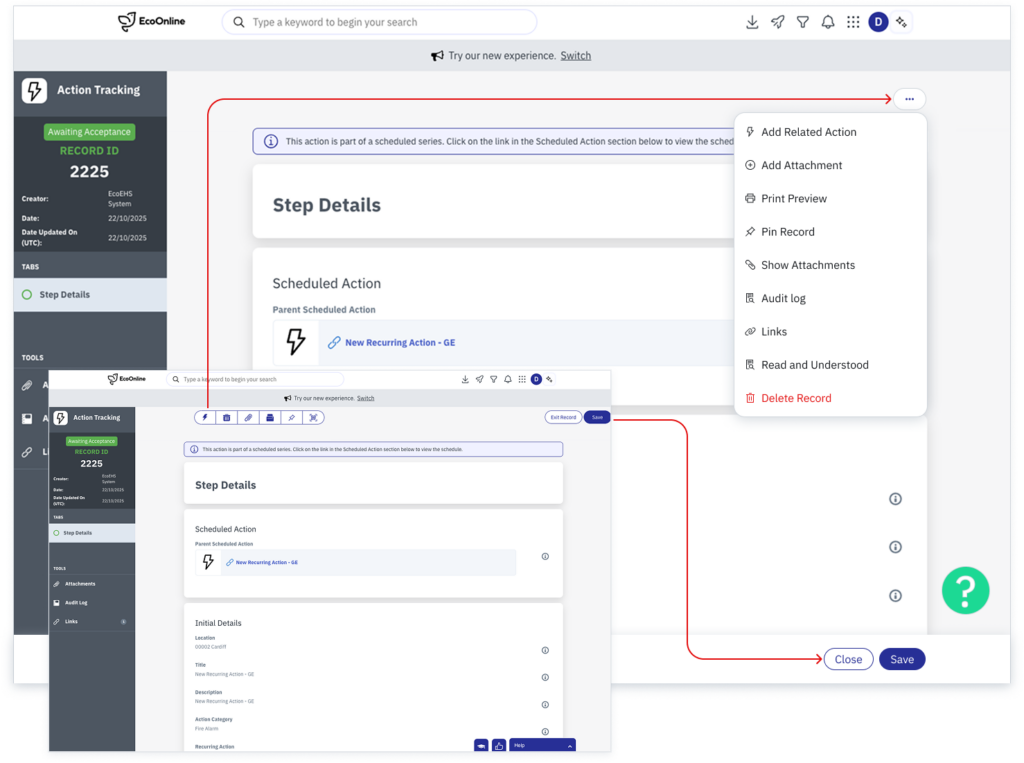
The Tools toolbar has been replaced with a streamlined More dropdown menu.
Problem Being Solved
The previous toolbar contained multiple secondary actions that created visual clutter and made the interface inconsistent across modules.
Key Capabilities
- Secondary actions are consolidated under a More dropdown
- Reduced visual clutter across record pages
- Consistent interaction pattern across modules
Why It Matters
Users can focus on the primary workflow while still having quick access to additional actions when required, creating a cleaner and more intuitive experience.
Notes
All actions previously available in the Tools toolbar are still available within the More menu.
Fixed Primary Action Buttons
What’s New
Primary actions such as Save and Submit are now fixed to the bottom of the screen.
Problem Being Solved
Previously, users often needed to scroll through long forms to locate key actions.
Key Capabilities
- Primary action buttons remain visible while scrolling
- Consistent placement across modules
- Faster form completion
Why It Matters
Keeping critical actions visible reduces friction and aligns the platform with modern usability patterns.
Simplified Print Configuration
What’s New
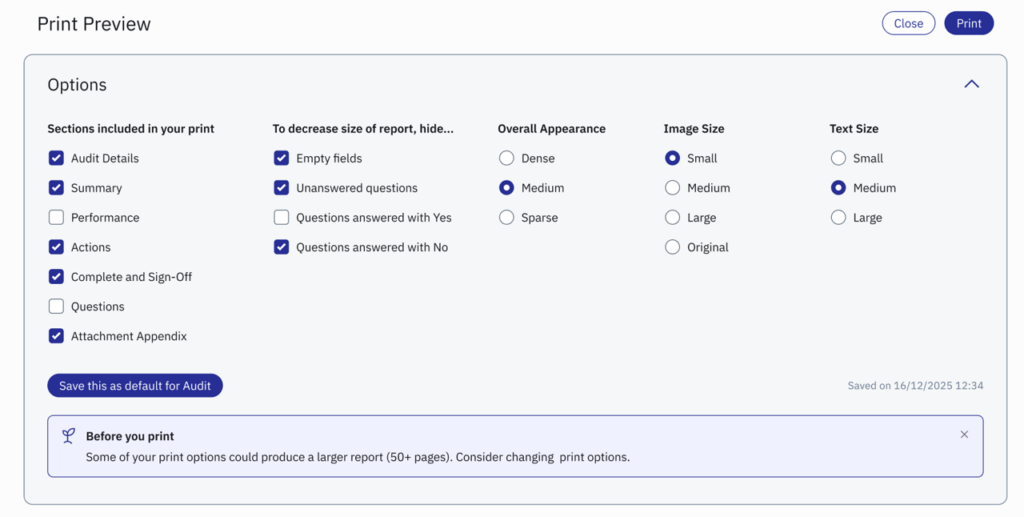
Print settings have been streamlined to allow configuration within a single, concise view.
Problem Being Solved
Users previously had to move between multiple tabs when configuring print layouts.
Key Capabilities
- Simplified configuration
- Fewer navigation steps
- Faster print setup
Why It Matters
This improvement reduces the effort required to generate reports and printable documentation.
These improvements are part of our ongoing effort to streamline everyday workflows and ensure the platform remains intuitive and efficient to use. We will continue evolving the interface to reduce friction and support faster task completion across all modules.