
We have made Permission Group management simpler by bringing module permissions and template access together into a single view.
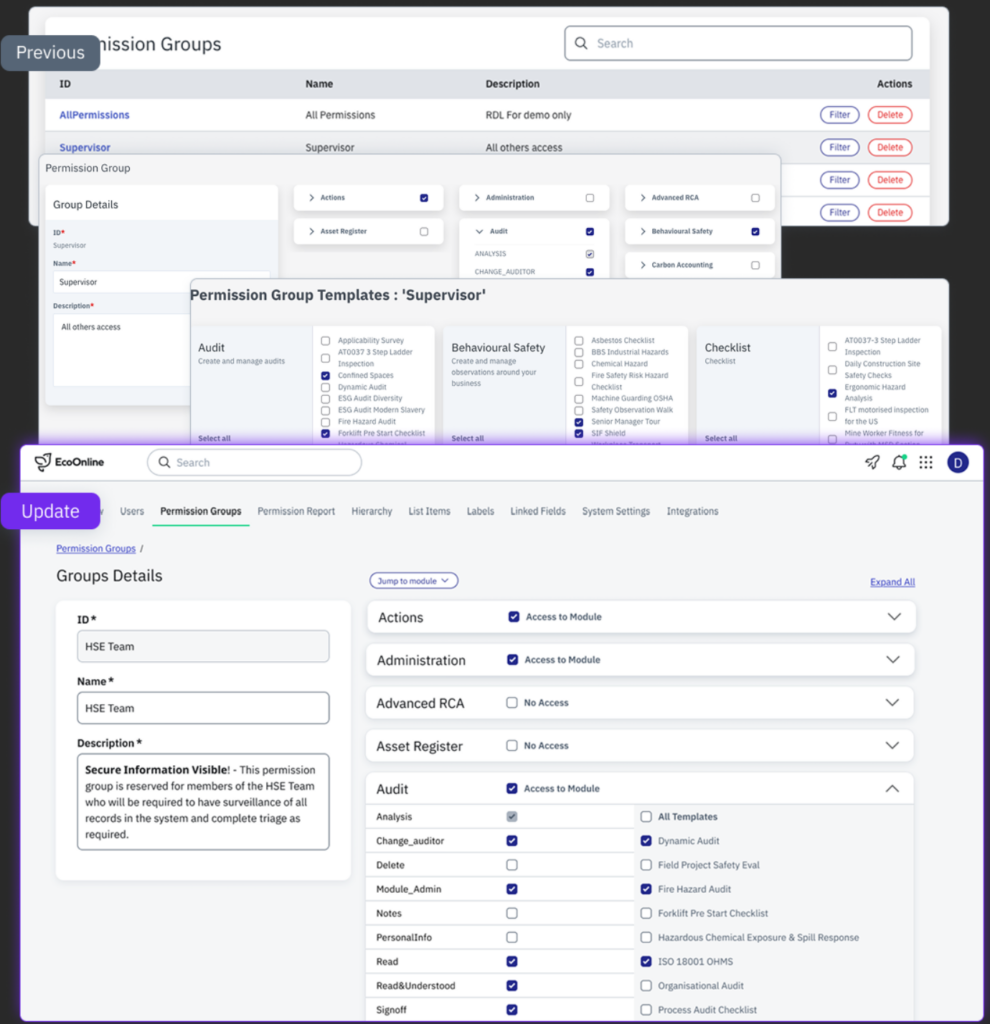
Previously, administrators needed to create or edit a permission group and then navigate separately to Filter to configure which templates that group can access.
Now permissions and template access are managed together while creating or editing the Permission Group — removing unnecessary steps and making the complete access configuration easier to understand.
🔄 What’s changed?
Before – Multiple steps
Administrators previously had to:
- Create or edit the Permission Group.
- Return to the Permission Groups list and select Filter.
- Manage template access from a separate screen.
Now – Everything in one place
The new experience allows administrators to configure the Permission Group, module permissions and template access from the same screen.
✨ What’s new?
- Permissions and templates together – manage module permissions and associated template access from the same view.
- Jump to Module – quickly navigate to a specific module and automatically expand its permissions and templates.
- Expand All – open all module sections for easier review.
- Select All Templates – quickly grant access to all available templates for a module.
- Expandable modules – expand or collapse individual modules to make larger permission groups easier to navigate.
- Existing permission controls retained – template visibility and editability will continue to respect existing administrator permissions.
🎯 Why we have made this change
This improvement has removed an unnecessary second step from Permission Group configuration.
By bringing related settings together, administrators now have a clearer view of what a group can do and which templates it can access, with fewer clicks and less navigation required to complete the setup.
There will be no change to the underlying permission model or existing access rules. We’re simplifying how permissions and template access are configured and managed.