
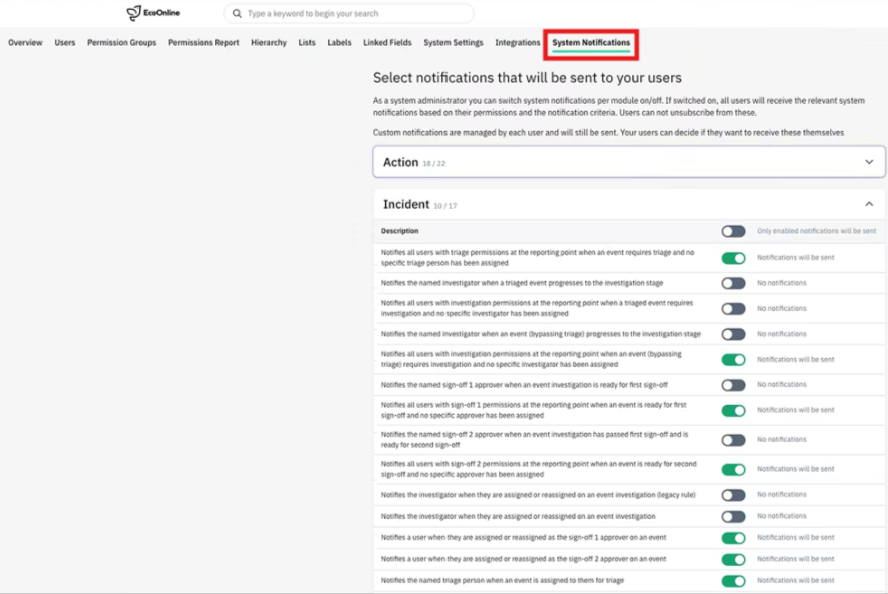
We’ve made it easier for System Administrators to manage how core email notifications are sent across EcoEHS. Previously, enabling or disabling these notifications required assistance from our Support or Product teams. With this release, administrators can now manage supported notifications themselves directly from Admin > System Notifications, providing greater control while reducing the time taken to make changes.
✨ What changed?
System Administrators can now:
- ✅ Enable or disable supported core email notifications using a simple toggle.
- 📋 View notifications grouped by module, with a description explaining the purpose of each notification.
- ⚙️ Configure notification settings directly within EcoEHS, with changes applied across the entire tenant.
This capability is available to users with the System Administrator permission. Notification settings are managed at tenant level and currently apply to all users.
💡 Why does it matter
Giving administrators self-service control removes the need to contact Support for routine notification changes, allowing organisations to respond more quickly as their processes evolve. It reduces administrative overhead, speeds up configuration changes and gives customers greater ownership of their own environment.
📈 What evidence do we have?
This enhancement was driven directly by customer feedback requesting greater control over system notifications without relying on Support. By moving notification management into self-service configuration, organisations can make changes immediately, reducing delays and improving operational efficiency.
ℹ️ Please note: Notification settings are configured at tenant level and currently apply to all users. User, role, site and workflow-level configuration is not currently available.